
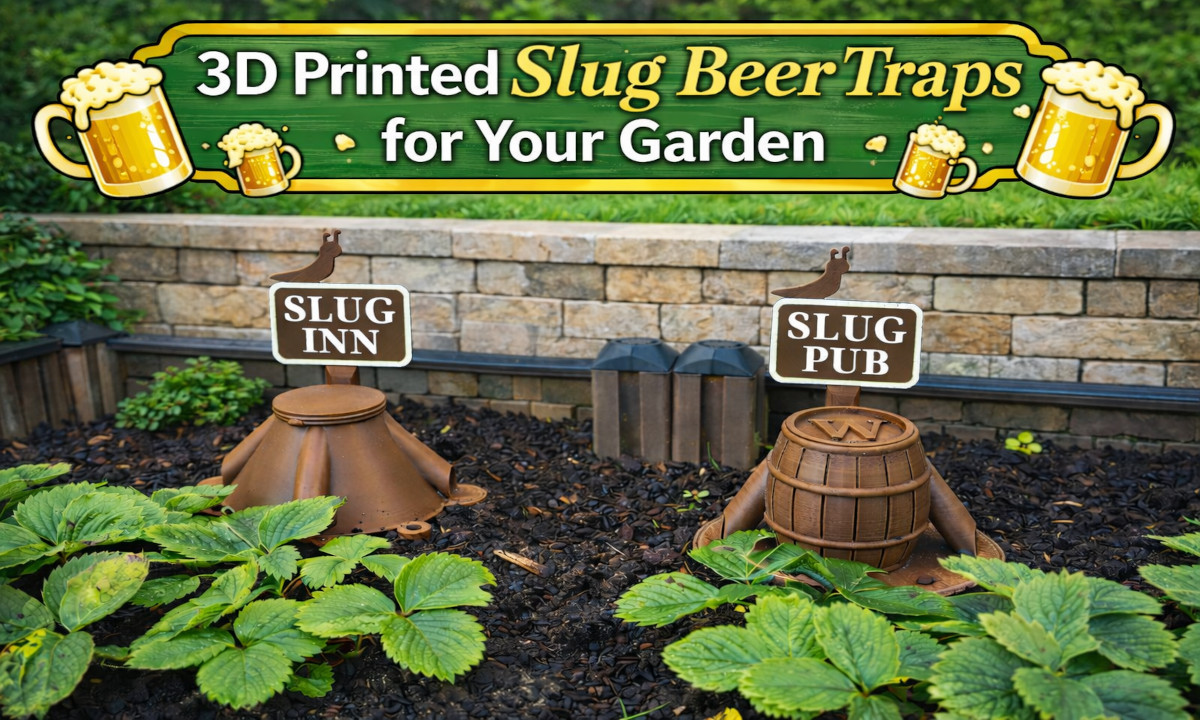
In this article, I share my 3D-printed Slug Inn and Slug Pub beer trap designs, along with ready-to-print STL files and basic assembly instructions. I created them to protect my strawberries from slug damage without using chemicals.
Both traps are simple, effective, and more visually pleasing than typical beer traps. Instead of looking like plastic containers in the garden, they blend in better and can even serve as small decorative elements while doing their job.
Why I Designed Own Beer Traps
Last year, I planted strawberries in my small garden and really enjoyed harvesting and eating them throughout the season. Unfortunately, I also had to deal with pests that damaged the plants, such as slugs, caterpillars, and moth larvae.
Since I’m not a big fan of using pesticides, I started looking for alternative solutions. I experimented with different traps for caterpillars and larvae, as well as traps for flying moths. While exploring what was available on the market, I realised that most commercially sold traps — and even many DIY designs — are nothing more than boring containers or simple cans.
With slug traps in particular, the dead slugs are often clearly visible, floating in the liquid, which in my opinion is neither pleasant to look at nor something you want in the middle of a garden. So I decided to design something that would be just as functional, but more visually appealing — something I would actually enjoy having in my garden.
That’s how the Slug Inn was created first — and later I designed a more decorative version called the Slug Pub.
“Slug Inn” beer trap


The Slug Inn is the original and simpler version of the trap.
It is designed to be filled with beer or other yeast-based liquids to attract and catch small slugs (approximately 1–5 cm in length). For larger pests, the 3D model can easily be scaled up if needed.
The Slug Inn consists of two main parts — a base and a lid — and optionally supports the same customizable banner design as the Slug Pub.
The trap has three entrance holes, allowing slugs to enter from multiple directions, which slightly increases the probability of catching them regardless of where they approach from.
Its simplified exterior makes it faster to print, easier to clean, and more convenient to produce in larger quantities. If you want something practical, efficient, and quick to print, the Slug Inn is a great option.
One pint of beer is enough to fill up to six traps, making it a very economical solution. I also added a few holes around the perimeter of the base so you can secure it to the soil using garden pins or nails (which can also be 3D printed — models are provided), helping to prevent the trap from tipping over in strong wind.
“Slug Pub” beer trap


After using the Slug Inn for some time, I decided to design a more decorative version — the Slug Pub.
Functionally, it works the same way, however, this version focuses more on aesthetics. Unlike the Slug Inn, the Slug Pub has two entrance holes. This slightly cleaner layout allowed me to keep the front design more visually appealing while still maintaining good functionality.
The 3D models
The trap models can be downloaded from my Tinkercad (link).
Printing Settings & Materials
I printed my traps using both PETG and ASA filaments. Both materials work well, but ASA is the preferred option since the trap is intended for outdoor use and will be exposed to sun, moisture, and temperature changes.
I would avoid using PLA, as it tends to degrade and deform quite quickly outdoors. ABS should also be a suitable material, although I haven’t tested it myself.
For printing with ASA, I used the following settings for my Ender 3 S1 Pro printer:
- Nozzle / bed temperatures: 255 °C / 90 °C
- Bed surface: smooth PEI sheet with glue stick applied
- First layer height: 0.3 mm
- Layer height: 0.2 mm
- Infill: 100%
- Supports: disabled for all parts
- Fan speed: 10% or OFF
(Low fan speed helps reduce warping when printing ASA) - Bed adhesion:
- Base: brim (12–16 mm)
- Other parts: skirt
- Ironing can be enabled for the banner base only to improve the surface finish
These settings worked well for my setup and produced reliable prints without warping, but feel free to adjust them to suit your specific 3D printer and filament.
Printing and Assembling the Banner

The banner consists of several parts: a base, text characters, and a frame (outline). To make the text clearly readable, the characters and the frame should be printed using a different filament color than the base.
I printed all banner parts separately: first the base, then the frame, and finally the text characters in two groups — “Slug” and “Pub” or “Inn”. It’s probably possible to print all the characters at once, but printing them separately reduces the risk of failure. If a single character detaches during printing, you would otherwise have to restart the entire print.
When printing the banner base, I enabled ironing in the slicer settings, which makes the top surface noticeably smoother. Ironing is not necessary for the other parts.
It’s also possible to use glow-in-the-dark filament for the characters and the frame if you want them to glow. I tested this option, but in my garden it turned out to be mostly ineffective, as the filament doesn’t glow long enough after sunset to be truly noticeable.
To assemble the banner, I used a rubber mallet to gently press the characters into their slots on the base. Be careful not to apply too much force with the mallet, as the parts can break. The frame snaps into place as the final assembly step.
As an optional step, the assembled banner can be lightly sanded using fine-grit sandpaper to improve the surface finish and remove any small imperfections.
Feel free to adapt the design to your garden conditions and experiment with placement for the best results. If you try it, share your experience and slug-control methods in the comments below.
